
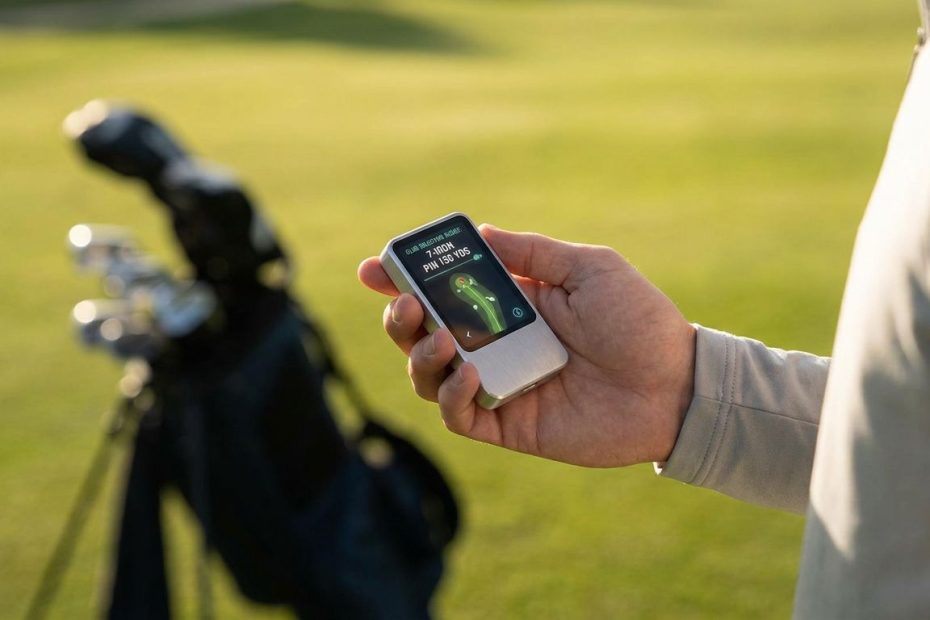
Artificial intelligence in golf works best when it turns your rounds into decisions you can use on the next tee, the next practice session, and the next club selection. The right gadget does not just collect numbers, it helps you manage the course better, tighten your feedback loop, and spot where your score is really leaking.
If you want smarter play, you need to know which golf technology actually helps on the course and which gear only adds noise. You are about to see where artificial intelligence shot tracking, launch monitors, swing analyzers, and voice caddie apps fit into your game, what each one does well, and where the trade-offs show up once you start using them.
What Makes A Golf Gadget “Ai-Powered” Instead Of Just Digital?
A standard golf gadget gives you raw output. It might show distance, ball speed, club path, or a yardage to the middle of the green. An artificial intelligence golf gadget goes further by interpreting those inputs and turning them into recommendations, pattern detection, and post-round analysis you can act on.
That difference matters more than many golfers realize. You do not lower scores just by owning data. You lower scores when the device helps you choose a safer target, confirms your real carry number with a 7-iron, flags that your approach game costs you more than your driver, or tells you your wrist conditions keep the face open at impact.
That is why the current wave of smart golf tech is built around three jobs. You use one layer to track shots and produce strokes gained analysis, another to guide club and target decisions during the round, and a third to sharpen practice with ball flight or swing-position feedback. When those pieces line up, your tech stack starts acting like a real caddie system instead of a pile of disconnected gadgets.
Arccos is one of the clearest examples of this shift. Its app positioning centers on automatic game tracking, strokes gained analytics, smart club distances, artificial intelligence strategy, and weather-adjusted “plays like” numbers built from a very large shot database. Hole19 is moving in a similar direction with Otto Artificial Intelligence, which focuses on personalized round analysis inside a mainstream Global Positioning System and scoring app. That tells you where the market is heading: less manual logging, more decision support.
Why Are Golfers Turning To Artificial Intelligence Caddies For Smarter Play?
You are seeing more golfers adopt artificial intelligence caddies for one simple reason: modern devices are reducing friction. Earlier golf tech often asked you to tag shots, manage extra sensors, keep your phone in a pocket all round, and then spend time fixing missed data afterward. Today’s better systems aim to remove those barriers.
That matters on the course because friction kills consistency. If the setup feels annoying, you stop using it. If the data review takes too long, you ignore it. The strongest products now push toward automatic capture, cleaner mobile workflows, and feedback that is easy to scan between rounds instead of another dashboard you never revisit.
Golfers also want clarity, not guesswork. Most players do not actually know how far they carry each club under normal conditions. Many overestimate driver distance, underestimate wedge inconsistency, and misread where they lose strokes. Artificial intelligence tools are getting popular because they help replace ego numbers with performance numbers. Once you know your real dispersion, real carry, and typical miss pattern, club selection gets tighter and course management improves.
There is also a strong practice angle. If your data shows you are bleeding shots from 125 to 175 yards, your next practice session becomes focused. If a launch monitor reveals spin and launch issues, you stop hitting aimless range balls. If a wrist sensor shows you why the clubface is unstable, you can work on a specific movement instead of searching for random swing thoughts.
How Does Sensorless Shot Tracking Change The On-Course Experience?
Sensorless shot tracking is one of the most interesting shifts in golf technology because it removes one of the biggest reasons golfers avoided shot-tracking systems in the first place. You no longer need to screw sensors into every club to get full-round data capture. That can make adoption much easier, especially if you dislike extra hardware on your grips or do not want to manage club-by-club setup.
Arccos Air is built around that idea. It is an artificial intelligence wearable designed to detect and record your shots automatically using onboard motion and location technology, with no club sensors and no phone required during the round. The product pitch is simple and smart: slip the wearable in your pocket, let it track the round, then review the strokes gained analytics, club distances, strategy features, and green-reading tools inside the app afterward.
From a usability standpoint, this is a major move. You spend less time thinking about hardware and more time playing golf. The practical upside is obvious if you have ever dealt with a dead sensor, a missed connection, or the annoyance of making sure every club is tagged and recognized before a round starts.
You should still pay close attention to compatibility and subscription requirements. Arccos states that Arccos Air includes a first-year game tracking subscription with purchase, and the platform materials note that sensorless tracking launched with iPhone support first. If you are buying with an Android device in mind, checking the current compatibility details before purchase is essential.
You also need realistic expectations. Removing sensors makes the system simpler, but golfers will still judge it by one standard: did it capture the round accurately enough to trust the post-round analysis? Early community conversation shows real curiosity, along with healthy skepticism about whether sensorless tracking can match more established club-sensor methods. That is a fair concern, and it is exactly the right question to ask before you commit your game data to any platform.
What Does Arccos Air Actually Help You Do Better During And After A Round?
Arccos Air is not just a shot counter. Its value comes from the stack around the tracking. Once your round is captured, you get access to strokes gained analytics, smart club distances, artificial intelligence strategy, and other planning tools that are designed to help you choose better shots and prioritize practice more effectively.
The most useful feature for many golfers is not the automation itself. It is the way the app shows where you gain and lose shots against a target handicap or peer group. That matters because score improvement is often misdiagnosed. You may think your driver is the issue when your real problem is approach proximity. You may blame putting when the real damage started with poor wedge distance control.
Smart club distances are another major benefit. Most golfers walk onto the course with one perfect number in mind for each club. That is not the number you should manage your game with. You need normal carry, expected rollout, and dispersion. A good artificial intelligence shot-tracking platform helps you build that truth over time.
Arccos also leans into strategy. Its app listing describes club and target recommendations built from your tendencies, course layout, hazards, weather, and pin position. That is the sort of guidance that can improve decision-making for mid-handicap golfers who lose shots through poor target discipline more than poor mechanics. If you routinely attack flags you should not attack, or hit clubs based on ego yardages, this kind of support can clean up your round quickly.
The catch is simple. The platform only becomes valuable if you stay with it long enough to build a reliable sample. One round is noise. Five to ten rounds begins to reveal patterns. A season of use creates the kind of data you can trust when choosing clubs, planning practice, and judging whether changes in your swing are helping or hurting.
Which Artificial Intelligence Golf Gadgets Help You Most In Practice?
On-course intelligence helps you score better, but practice technology is where a lot of real improvement starts. If your practice sessions are unfocused, even the best course-management app will only take you so far. The strongest training gadgets answer one of two questions: what did the ball do, and what did your body do to produce it?
Launch monitors answer the ball question. They measure pieces of impact and flight that help you understand carry distance, launch, spin-related behavior, shot shape, and consistency. These devices are excellent when you want to dial in wedges, compare clubs, tighten dispersion, or build a home simulator setup that gives every practice swing a measurable outcome.
Swing analyzers answer the body question. They focus on movement patterns, wrist angles, tempo, or other mechanics that influence clubface and strike. These are useful when your issue is not just what the ball did but why it did it. If your face control is unstable, a body-measurement tool can give you a faster route to a fix than staring at random ball-flight numbers.
The best setup depends on your bottleneck. If you do not know your real distances and impact patterns, start with a launch monitor or shot-tracking system. If you already know the ball outcome but cannot fix the motion behind it, a swing analyzer becomes more valuable. Golfers waste money when they buy the wrong category. You need the device that measures the variable costing you shots right now.
How Should You Think About Garmin Approach R10 Vs Rapsodo Mlm2Pro?
If you are shopping budget launch monitors, this is one of the most common comparisons for a reason. Both products appeal to golfers who want meaningful practice data without stepping into premium launch monitor pricing. Yet they suit different buyers depending on space, subscription tolerance, and how much precision you expect indoors versus outdoors.
The Garmin Approach R10 is often viewed as an accessible entry point for structured practice and simulator play. It appeals to golfers who want a portable radar-based unit, range session feedback, and a lower barrier to entry. It is a popular option for players who want to build a repeatable practice habit without spending premium money on a high-end monitor.
The Rapsodo MLM2PRO draws attention from golfers who want more useful spin and shot-shape information, especially in net setups where seeing the full flight is not possible. Community discussion often frames the MLM2PRO as the stronger option when you want richer ball-flight detail, but that comes with more buyer scrutiny around subscriptions, setup demands, and connection reliability.
You should also think about your hitting environment. Budget launch monitors do not perform identically in every garage, backyard, or range setup. Radar units need enough room to read ball flight properly. Camera-assisted systems can behave differently depending on lighting, ball type, and setup discipline. The best purchase is not the one with the best marketing sheet. It is the one that works cleanly in the space where you will actually practice every week.
If your goal is simple session structure, distance gapping, and entry-level simulator use, the Garmin Approach R10 remains a relevant option. If your goal is richer strike and shot-shape feedback with a stronger emphasis on measured ball behavior, the Rapsodo MLM2PRO is the device golfers often place ahead. You need to match the tool to the job instead of chasing whichever model gets louder praise online.
What Are The Hidden Costs And Friction Points You Need To Check Before Buying?
This is where many golfers make poor buying decisions. They compare the hardware price and stop there. That misses the real ownership cost, which often includes subscriptions, app lock-in, compatibility rules, special balls for certain measurements, and time spent dealing with setup friction.
Rapsodo’s MLM2PRO documentation notes a one-year Premium Membership during registration, and its manual references measured spin and spin-axis support tied to the use of Callaway Revolutions Per Minute, or RPT, Chrome Soft X balls in that mode. That detail matters. If you buy a launch monitor expecting every advanced metric to be seamless with any ball in any setup, you may be disappointed.
Arccos has its own version of this issue. Arccos Air includes a first-year game tracking subscription with purchase, and hardware-only configurations require an active game tracking subscription to unlock the full app experience. If you stop paying, you are not just losing bonus features. You are affecting the value proposition of the system itself.
Compatibility is another buyer trap. A product might be marketed broadly, but a feature you care about may be limited at launch or tied to specific devices. Arccos materials make clear that sensorless game tracking with Arccos Air launched with iPhone support first. If your setup depends on Android, you should confirm the current device support before spending money.
Then there is trust. Golfers can live with a subscription if the product works. They can live with setup rules if the output is dependable. What they will not tolerate for long is data they do not believe. Community feedback around launch monitors and shot trackers keeps returning to the same themes: dropped connections, questionable readings, and frustration when the numbers do not align with what the player sees. You need to treat reliability as part of the price.
Where Do Swing Analyzers Like HackMotion Fit Into A Smarter-Play Setup?
HackMotion sits in a different lane from shot trackers and launch monitors. It is not trying to tell you where your drive finished or how many strokes you lost on approach shots. It is trying to show you what your wrists are doing during the swing and give you real-time feedback that you can train against.
That makes it useful for a specific type of golfer. If your clubface control is inconsistent, your release pattern is unreliable, or you keep fighting blocks, hooks, or weak strikes tied to wrist conditions, a device like HackMotion can speed up the learning process. You get immediate information on movement patterns instead of guessing whether the feel you are working on is actually showing up.
Golf Monthly’s current swing-analyzer coverage positions HackMotion as one of the stronger tools in this category, especially for golfers dealing with inconsistency in strike and face control. Community discussion adds a practical note: golfers who know wrist mechanics are part of their issue often love the device, while others feel it can become too narrow if they expect it to solve every swing problem by itself.
That is the right way to frame it. HackMotion is not a replacement for a launch monitor, and a launch monitor is not a replacement for HackMotion. One measures a movement variable that influences the strike. The other measures what the strike produced. If your problem is rooted in face control, body feedback may give you the faster route to change. If your problem is distance control, launch conditions, or impact quality, ball data may matter more.
You get the best return when you use the tool in the right order. Diagnose the leak, then buy the device that measures that leak. That one decision saves golfers a surprising amount of money and wasted practice time.
Are App-Only Artificial Intelligence Caddies Worth Using Before You Buy Hardware?
Yes, and for many golfers they are the smartest starting point. App-only artificial intelligence caddies give you a lower-friction way to test whether you will actually use technology during your rounds before you commit to dedicated hardware. That matters because good golf tech only pays off if it fits your habits.
Copperline Golf recently launched an artificial intelligence voice caddy app on iOS and Android, positioning it around voice-guided support, passive shot tracking, analytics, and different caddie personalities. Hole19’s Otto Artificial Intelligence pushes personalized round analysis inside one of the best-known Global Positioning System and scoring app ecosystems in golf. Those launches point to a useful trend: you can now access more artificial intelligence support without buying a separate device on day one.
This category makes sense if you want guidance, round review, and lighter data capture without building a full hardware stack. It is also a good fit if you are still figuring out your own appetite for in-round technology. Some golfers want deep analytics. Others only want better yardages and a clearer post-round summary of what went wrong.
The limitation is straightforward. App-only tools do not always capture data as cleanly or as deeply as dedicated hardware. They can still be excellent for golfers who want entry-level artificial intelligence help, but they may not satisfy players who want precise club-level tracking, richer impact metrics, or advanced simulator integration. You should see them as the easiest on-ramp, not always the final destination.
How Do You Build The Right Artificial Intelligence Golf Setup For Your Game?
You do not need every category of device. You need the smallest stack that gives you clear decisions. Start by identifying where your score is leaking. If you manage the course poorly and guess at yardages, begin with a shot-tracking or caddie platform. If your practice lacks measurable feedback, add a launch monitor. If your face control or wrist conditions are unstable, a swing analyzer can earn its place.
A practical setup for many golfers starts with one on-course intelligence tool and one practice tool. On-course, that could be Arccos Air or another caddie-style system that captures rounds and highlights strokes gained trends. In practice, that could be a launch monitor if you need carry and dispersion numbers, or a wrist analyzer if your ball flight problems come from a repeatable motion issue.
You also need to match your budget to your tolerance for subscriptions. Some golfers would rather pay more once and reduce recurring costs. Others are fine with a subscription if the software keeps improving and the analytics stay useful. Neither approach is wrong. The mistake is ignoring the ownership model until after the purchase.
Your environment matters too. A home net setup calls for different priorities than a golfer who mainly practices outdoors. A player who walks and keeps tech minimal during a round needs different gear than a player who likes rich app interaction and constant feedback. The best buying decision feels boringly practical. It fits your phone, your range setup, your budget, and your patience level.
What Should You Buy First If Your Goal Is Lower Scores, Not Just More Tech?
If your goal is lower scores, buy the tool that helps you make better decisions immediately. For many golfers, that means starting with a shot-tracking and analytics platform, not a swing gadget. The reason is simple: smarter targets, real club distances, and honest strokes gained analysis can improve scoring before your swing changes at all.
If you already know your on-course patterns and your biggest weakness shows up in practice, then a launch monitor may be the first buy. It gives you measurable feedback on distance gapping, strike patterns, and consistency. That is powerful if your scoring suffers from poor wedge control, unreliable carry numbers, or no structure in practice.
If a coach or your own video work has already identified wrist mechanics or clubface control as the main issue, then a specialized tool like HackMotion can become the right first purchase. It is more targeted, but targeted tools are exactly what you want once the diagnosis is clear.
The buying order many golfers should follow is simple: start with diagnosis, move to decision support, then add deeper practice measurement. That sequence keeps you from spending on attractive gear that never fixes the reason your handicap stays stuck.
Key Decisions for an AI Golf Setup
- Best First Buy: Shot tracking with strokes gained if you want lower scores.
- Best Practice Add-On: Launch monitor for carry and dispersion, swing analyzer for wrist control.
- Watch For: Subscriptions, compatibility, setup friction, and trust in the data.
- Lowest-Friction Start: Artificial intelligence caddie apps before dedicated hardware.
Take The Smarter Route To Better Golf
You do not need more golf gadgets. You need the right one solving the right problem at the right time. Artificial intelligence golf tech earns its place when it helps you choose better clubs, manage misses with discipline, and practice against measurable feedback instead of vague feel. That is where lower scores start to show up. If you build your setup with that standard in mind, your gear stops being a novelty and starts acting like a dependable part of your game plan.
References:
- https://apps.apple.com/us/app/arccos-golf/id841396631
- https://www.arccosgolf.com/products/air
- https://www.arccosgolf.com/blogs/community/introducing-arccos-air-no-phone-no-sensors-just-golf
- https://www.golfmonthly.com/news/the-day-of-sensorless-shot-tracking-has-finally-arrived
- https://www.firstcallgolf.com/industry-news/release/2025-07-09/hole19-launches-otto-ai
- https://www.prnewswire.com/news-releases/copperline-golf-launches-ai-voice-caddy-app-on-ios-and-android-302751990.html
- https://www.golfmonthly.com/buying-advice/best-golf-swing-analyzers-year
- https://www.golfmonthly.com/reviews/golf-tech-and-training-aids/hackmotion-sensor-4-review
- https://fccid.io/2AH3O-MLM2PRO/User-Manual/user-manual-7863906.pdf
- https://www.reddit.com/r/golf/comments/1oc65o6/garmin_r10_vs_rapsodo_mlm2pro/
- https://www.reddit.com/r/golf/comments/1r8ep8o/rapsodo_mlm2_pro_vs_garmin_r10_which_one/
- https://www.reddit.com/r/golf/comments/1la5863/hackmotion_is_legit/.

Barry Bekkedam is an entrepreneur and finance executive focused on investment management and advisory. A former Villanova standout and member of Canada’s men’s national basketball team, he now leads ventures in asset management and philanthropy, including the Barry Bekkedam Foundation supporting education and community development.